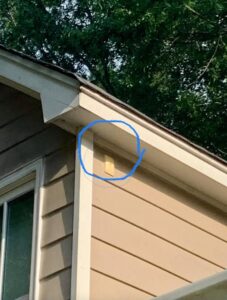
Late at night, when the neighborhood is quiet and the streets are dimly lit, small details on houses tend to stand out more than they do during the day. A porch light glowing softly, a motion sensor switching on as someone walks by, or perhaps a faint flicker coming from the side of a home.
Some people notice something even stranger.
A tiny box mounted on the exterior wall of a house—often near the front door, garage, or utility area—blinks steadily in the dark. Sometimes the light is red. Sometimes it’s yellow or amber. Occasionally it flashes in a regular rhythm that makes people wonder what exactly it’s doing.
If you’ve ever seen one of these blinking lights and wondered whether it was a security warning, a technical malfunction, or something mysterious, you’re not alone. Many homeowners discover these devices without fully understanding their purpose.
In most cases, that blinking light belongs to a DSC alarm status module, a component of a home security system designed to communicate information about the system’s condition.
Although it looks simple, the device actually plays a useful role in keeping homeowners informed and deterring potential intruders.
Understanding what that blinking light means can help you interpret the signals your home is sending—and might even give you peace of mind when you notice it glowing outside at night.
The Small Box Many People Overlook
If you walk around older neighborhoods or homes equipped with security systems, you might spot a small rectangular device attached to the exterior wall.
It doesn’t look particularly important. Most people assume it’s just another electrical component or part of the alarm system wiring.
But the tiny blinking light on that box has a specific purpose.
The device is commonly known as a DSC alarm status module, and it’s designed to show the current condition of your security system through simple visual signals.
DSC stands for Digital Security Controls, a well-known manufacturer of alarm systems used in homes and businesses around the world.
These modules were especially common in wired security systems installed in previous decades, though some modern systems still use similar indicators.
While they may look outdated compared to today’s smartphone-connected security apps, these small status lights remain surprisingly practical.
What the DSC Alarm Status Module Does
At its core, the DSC alarm status module functions as a visual notification system.
Inside the home, the main security panel monitors sensors, door contacts, motion detectors, and other components.
The exterior module connects directly to that control panel through wiring.
When something changes in the system—such as a triggered alarm or maintenance issue—the module displays a signal using its blinking light.
Think of it as a simple communication tool that shows the health and activity of your security system without needing to open the control panel inside.
Anyone who knows how to interpret the signals can quickly understand what’s happening with the system.
Why the Light Is Installed Outside
At first, it might seem strange to place a security indicator outside where everyone can see it.
But there are several reasons for this design.
One of the most important reasons is visibility.
When the module is mounted outside the house, homeowners can check the system status before entering the building.
For example, if the alarm has recently been triggered, the light may flash in a certain pattern.
This warning could help someone approaching the house know that the alarm system was activated while they were away.
Another reason involves deterrence.
Security systems work partly by discouraging potential intruders before a crime even begins.
A blinking indicator shows that the property has an active alarm system.
For someone considering breaking in, that flashing light may be enough to make them reconsider.
In this way, the tiny blinking module contributes to overall home security simply by being visible.
What the Different Light Colors Mean
The lights on a DSC alarm status module typically use different colors to communicate specific information.
Although exact meanings can vary slightly depending on the system model, there are some common interpretations.
Flashing Red Light
A blinking red light usually means the alarm system has been triggered recently.
In many cases, the red light continues flashing for up to 24 hours after an alarm event.
This lets the homeowner know that the system detected something unusual while they were away.
Sometimes the red light can also indicate a system fault or communication issue.
For example, the alarm may have difficulty connecting with monitoring services or wireless components.
If the red light continues for an extended period, it may be worth checking the alarm panel inside the house.
Yellow or Amber Flashing Light
A yellow or amber light typically signals a maintenance warning.
This could include issues such as:
-
A low backup battery
-
A communication error
-
A sensor that needs servicing
-
A system component that requires attention
While these warnings don’t necessarily mean the alarm system is failing, they do suggest that something should be checked soon.
Ignoring these signals could eventually reduce the system’s effectiveness.
Why the Light Sometimes Blinks Continuously
Many people notice that the light seems to blink regularly at night, even when nothing appears to be wrong.
In some systems, a steady blinking pattern simply indicates that the module is active and functioning properly.
The blinking serves as confirmation that the alarm system is powered and communicating with the control panel.
This behavior is similar to the small activity lights found on internet routers or electronic devices.
They flash to show that the system is operating normally.
Why You Notice It More at Night
During the day, the tiny LED light on the module may be difficult to see.
Sunlight and bright surroundings make the glow less noticeable.
But at night, even a small LED can appear surprisingly bright.
Darkness makes the blinking pattern stand out, especially if the module is mounted near an entrance or walkway.
That’s why many homeowners only notice the blinking light after sunset, when it suddenly seems more prominent.
The Role of Alarm Systems in Home Security
To understand why modules like this exist, it helps to look at how modern alarm systems work.
Home security systems typically include several key components:
-
A central control panel
-
Door and window sensors
-
Motion detectors
-
Keypads or touchscreen interfaces
-
Audible sirens or alarms
-
Communication devices for monitoring services
The control panel acts as the brain of the system.
It constantly checks signals from sensors placed around the home.
If a door opens unexpectedly or motion is detected when the system is armed, the control panel triggers an alert.
This alert can activate sirens, send notifications, or contact a monitoring service.
The alarm status module simply adds another layer of communication by showing the system’s status visually.
What to Do If the Light Won’t Stop Flashing
If you notice that the blinking light continues for a long time and you’re unsure why, there are a few steps you can take.
First, check the main alarm panel inside your home.
Most panels display messages or codes that explain what the system is detecting.
You may see notifications such as:
-
Low battery warnings
-
Sensor faults
-
Communication errors
These messages can help you determine whether the blinking light is normal or requires attention.
If the panel doesn’t provide enough information, the system manual may explain what each light pattern means.
When to Call a Professional
Sometimes troubleshooting a security system can become complicated.
If the blinking light indicates a persistent problem and you cannot determine the cause, contacting a security professional may be the best option.
Technicians who specialize in alarm systems can diagnose wiring issues, sensor failures, or communication errors.
They can also ensure the system remains properly configured to protect your home.
Regular maintenance helps keep alarm systems reliable and effective.
Why Older Systems Still Use These Modules
In today’s world of smartphone apps and wireless alerts, the idea of a blinking light might seem old-fashioned.
However, visual indicators remain useful for several reasons.
First, they provide instant feedback without needing to check an app or screen.
Second, they work even if internet connectivity is temporarily unavailable.
And third, they require very little power and maintenance.
For these reasons, many security systems still include simple visual indicators alongside modern digital features.
A Quiet but Effective Deterrent
Even though the alarm status module is small, it plays a subtle role in discouraging crime.
Potential intruders often look for easy targets.
A home that clearly displays signs of an active security system may appear less attractive to someone looking for an opportunity.
The blinking light serves as a reminder that the property is monitored.
While it may seem insignificant, that tiny LED can influence decisions in ways homeowners might never realize.
Why Some Houses Have Them and Others Don’t
Not every home with a security system includes an external status module.
Some newer systems rely entirely on digital notifications and smartphone alerts.
Others place indicators directly on indoor control panels rather than outside.
Homes built or upgraded during certain periods—particularly when wired alarm systems were popular—are more likely to have these exterior modules.
So if you see one on your house, it simply reflects the type of security system installed.
A Small Device With a Clear Purpose
Although it might seem mysterious at first, the blinking light outside your home isn’t anything unusual.
It’s simply a status indicator connected to your security system.
By flashing different colors and patterns, it communicates information about the system’s activity, health, and recent events.
Once you know what it means, the blinking light becomes less of a mystery and more of a helpful tool.
The Next Time You Notice It
The next time you step outside at night and see that small light blinking on your home, you’ll know exactly what it represents.
It’s not a glitch or random signal.
It’s your security system quietly doing its job—monitoring your home, reporting its status, and reminding anyone nearby that the property is protected.
Sometimes the smallest details around our homes carry more meaning than we realize.
And in this case, that tiny blinking light is part of a system designed to keep you and your home safe.